Posts

Snippet: align a TextView around an image

Image
A few weeks ago I discovered the Spans on Android,after reading the wonderful post by Flavien Laurent . In this post I will describe how to realize a particular layout not very common on Android: a text around an image. This layout is not an Android Pattern, but it can be useful in same cases. As always it is just an example, and you should improve some points in your real project. Use a simple layout: To achieve our scope, we can use a LeadingMarginSpan.LeadingMarginSpan2 . This span allows the implementor to specify the number of lines of text to which this object is attached that the "first line of paragraph" margin width will be applied to. /** * */ class MyLeadingMarginSpan2 implements LeadingMarginSpan.LeadingMarginSpan2 { private int margin; private int lines; MyLeadingMarginSpan2(int lines, int margin) { this.margin = margin; th...

A way to evaluate an Android open source library

This last year, I have had opportunity to learn many things about open source libraries. Working on my small library (thanks to everybody for the support and help!) I could see some aspects on the other side. Before using a library, you should check some points. License It is a very focal point! The first thing to look at is the what license the code has been released. Open source doesn't mean that you can use the code in any context. There are various types of licenses and you should check if the license is compatible with your project otherwise you can have legal issues. Maintenance Check the last commits in the repository. If the last commit was 1 year ago likely the project has been abandoned (or it is complete and doesn't require updates...). Also it is very important to check how often the project is updated (or was updated). Do not underestimate this point. If you use a library which is no longer maintained, you could have problems in the future. Branch...

Drawing shapes with fingers

Image
It is very simple to draw basic shapes with fingers. As always, it is just an example, you can improve it in many ways. First of all we need a custom View . public class DrawingView extends View { } Then we will use a Bitmap, a Canvas and a Paint ojbects: protected Paint mPaint; protected Bitmap mBitmap; protected Canvas mCanvas; To initialize the bitmap and the canvas, we can override this method in our View: @Override protected void onSizeChanged(int w, int h, int oldw, int oldh) { super.onSizeChanged(w, h, oldw, oldh); mBitmap = Bitmap.createBitmap(w, h, Bitmap.Config.ARGB_8888); mCanvas = new Canvas(mBitmap); } If you need to create a new Canvas, you must define the Bitmap upon which drawing will actually be performed. The Bitmap is always required for a Canvas. Then we can define the paint object. The Paint holds the information about the style and the color which we will use to draw. For example: public...

Restricted Profiles Settings

Image
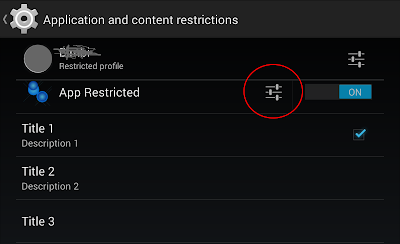
Yesterday Netflix for Android introduced the Restricted Profiles feature. It is a very powerful opportunity, but very few apps are using this feature. Remember that restricted profiles require API 18. Let's see how to realize it. It is very simple. First of all, we need to use a BroadcastReceiver that receives the ACTION_GET_RESTRICTION_ENTRIES intent. When we click on the setting icon, our BroadcastReceiver is called. Our receiver has a EXTRA_RESTRICTIONS_INTENT Bundle which contains the key-value pairs for each restriction. @Override public void onReceive(final Context context, Intent intent) { final Bundle currentRestrictions = intent.getBundleExtra(Intent.EXTRA_RESTRICTIONS_BUNDLE); In onReceive() method you have to create a RestrictionEntry for each restriction your app provides. Each RestrictionEntry defines a restriction title, description, and one of the following data types: TYPE_BOOLEAN TY...

Some thoughts about AppOpsManager and 4.4

Image
Android 4.3 introduced a new hidden feature: AppOps. Android 4.4 improved this feature, but it is still hidden. Someone talks about it as an "App Permission Manager". We have very few information about it, but it is a lot more than a simple permission manager. Currently there is no action to launch it. You can see it in Manifest.xml: https://github.com/android/platform_packages_apps_settings/blob/master/AndroidManifest.xml#L802 A simple way could be this: Intent intent = new Intent("android.settings.SETTINGS"); intent.putExtra(PreferenceActivity.EXTRA_SHOW_FRAGMENT, "com.android.settings.applications.AppOpsSummary"); startActivity(intent); Here you can find info about apps which use location-permissions, contact-permissions, message-permissions.... In the list, for each app you can see the last use of this permission, and if you click on an item, you can see a full detail. Pay attention! You can disable permi...

NotificationListenerService and kitkat

Image
Android 4.3 (API 18) introduced NotificationListenerService . I published a post about it a few months ago. Android 4.4 (API 19) added new features, and now we can have a lot of extra info about a notification (before we need to use reflection to read some info). As in 4.3,to use the NotificationListenerService we have to extend the NotificationListenerService and implement onNotificationPosted() and onNotificationRemoved() methods public class SimpleKitkatNotificationListener extends NotificationListenerService { @Override public void onNotificationPosted(StatusBarNotification sbn) { //.............. } @Override public void onNotificationRemoved(StatusBarNotification sbn) { //.............. } } Then we must declare the service in the manifest file with the BIND_NOTIFICATION_LISTENER_SERVICE permission and include an intent filter with the SERVICE_INTERFACE action ...

Common tips about Gradle - part 2

In my previous post I wrote some common gradle tips. In this post I will continue to collect other common (and basic) cases. I would like to use the Eclipse folders structure in Android Studio. How to achieve that? In your build.gradle you can set this script: android { sourceSets { main { manifest.srcFile 'AndroidManifest.xml' java.srcDirs = ['src'] resources.srcDirs = ['src'] aidl.srcDirs = ['src'] renderscript.srcDirs = ['src'] res.srcDirs = ['res'] assets.srcDirs = ['assets'] } } } Where should I create the libs folder for my jars file? You can use this structure: - root - project libs myjar.jar src main java res build.gradle In build.gradle: dependencies { compile files('libs/myjar.jar') } Where should I create the aidl ...